Cadence
A desktop video editor where you edit video by editing text. Point it at a talking-head recording, get a transcript, and cut your video by deleting sentences. Built with Tauri and React.
My original thought was to build a real Cursor for video editing. The challenge is that you have to translate video into something an LLM understands — text. I chatted with Claude about it, and it suggested doing image recognition on videos to understand what's happening, but that's dependent on scene changes, something raw video doesn't have. An hour-long video of someone playing golf has no scene changes. Translating that into text would be expensive, slow, and a very challenging engineering problem. Getting the essence of video into text is a problem I couldn't figure out how to solve.
I also wanted to fork an open-source editor and add an AI agent that can make any tool call inside the app, but the lack of an MIT-licensed editor was a blocker. So I pivoted to where the problem is more natural: talking-head content. If the content is speech, the editing interface should be text. You read your transcript, delete the parts you don't want, and the video follows. No timeline scrubbing, no waveform staring. Just words on a screen.
My use case: I can just talk and ramble at a camera about some topic, then load it into Cadence and have an AI agent help me structure my thoughts — rearranging sections, cutting others. I tested it with an old 45-minute clip from when my friends wanted to start a sports podcast.
When you import a video, Cadence sends the audio to Deepgram's API for word-level transcription. Every word comes back with a precise start and end timestamp. The transcript renders as editable text in the UI, but underneath, each word is a data structure pointing to a time range in the video.
Deleting a sentence from the transcript removes those timestamp ranges from the edit decision list. Rearranging paragraphs reorders the video segments. The user never touches a timeline — they interact with text, and the system maintains a mapping from words to video frames.
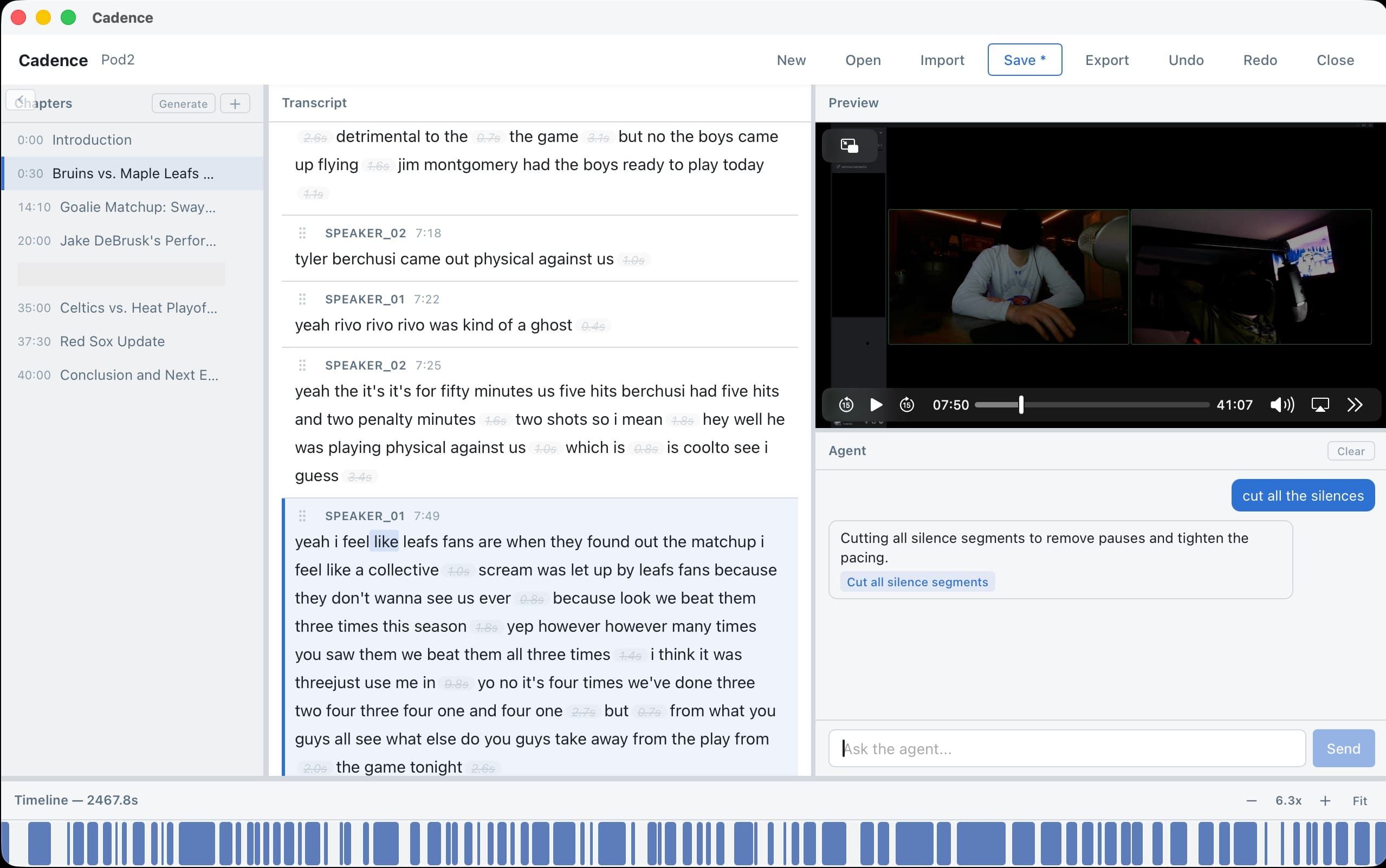
An LLM agent can analyze your transcript and suggest structural edits — reordering sections for better flow, identifying redundant points, tightening language. The agent system uses a tool registry, so it can read the transcript, propose changes, and apply them through the same text-editing interface. Supports Claude, GPT, and Grok as backends.
┌─────────────────────────────────────────────┐
│              Tauri Shell (Rust)              │
│                                             │
│  ┌──────────────┐    ┌──────────────────┐   │
│  │  React UI    │◄──►│  Tauri Commands  │   │
│  │  (Vite)      │    │  (IPC Bridge)    │   │
│  └──────────────┘    └────────┬─────────┘   │
│                               │             │
│  ┌────────────────────────────▼──────────┐  │
│  │  Processing Layer                     │  │
│  │                                       │  │
│  │  ┌─────────────────┐                  │  │
│  │  │  Deepgram API   │                  │  │
│  │  │  (transcribe)   │                  │  │
│  │  └─────────────────┘                  │  │
│  │                                       │  │
│  │  ┌─────────────────┐                  │  │
│  │  │  FFmpeg         │                  │  │
│  │  │  (video I/O)    │                  │  │
│  │  └─────────────────┘                  │  │
│  │                                       │  │
│  │  ┌─────────────────┐                  │  │
│  │  │  LLM Agent      │                  │  │
│  │  │  (tool registry)│                  │  │
│  │  └─────────────────┘                  │  │
│  └───────────────────────────────────────┘  │
└─────────────────────────────────────────────┘
The desktop shell is Tauri v2 — Rust for the native layer, React for the UI. This gives native performance and a sub-100MB binary, compared to Electron's typical 300MB+. Tauri commands handle transcription, FFmpeg orchestration, and agent execution through the IPC bridge.
The agent system is stateless by design. Each invocation gets the current transcript state, a tool registry (read transcript, apply edit, preview result), and produces a set of edit operations. There's no persistent agent memory — each restructuring suggestion is independent.
General video editing with AI requires translating visual content into text, which is an unsolved problem at reasonable cost and speed. Talking-head content is a more natural problem surface — the content is text. Transcription gives you a perfect representation of the video, and text editing maps directly to video editing. I recently saw a Y Combinator-backed “Cursor for video editing” launch and I'm curious how they solved the general video problem.
Video editing demands performance. Tauri gives native Rust bindings, a fraction of Electron's memory footprint, and direct filesystem access without the overhead of a bundled Chromium. The tradeoff is a smaller ecosystem, but for this use case the performance wins are non-negotiable.
I know building before customer interviews is backwards. But with agentic coding I scaffolded this MVP in one evening. When the cost of prototyping is that low, it makes sense to have something tangible before reaching out to potential users. My next move is to reach out to small YouTubers and see if this is something they'd want to try.
I still want to crack the general video editing problem. If there were a way to get the essence of non-talking video into text cheaply and quickly, you could build a tool where you say “here are a bunch of clips, make me a cinematic one-minute edit” and it just works. I don't know how to solve that yet, but it's the version of this that would be truly transformative.
I'd also like to fork an existing open-source editor and add an AI agent with full tool-call access to the editing interface. That would give you both traditional timeline editing and AI-assisted editing in one tool, rather than building a new editor from scratch.